Recover deleted Data Subject Requests
By Sypher | Published in Resources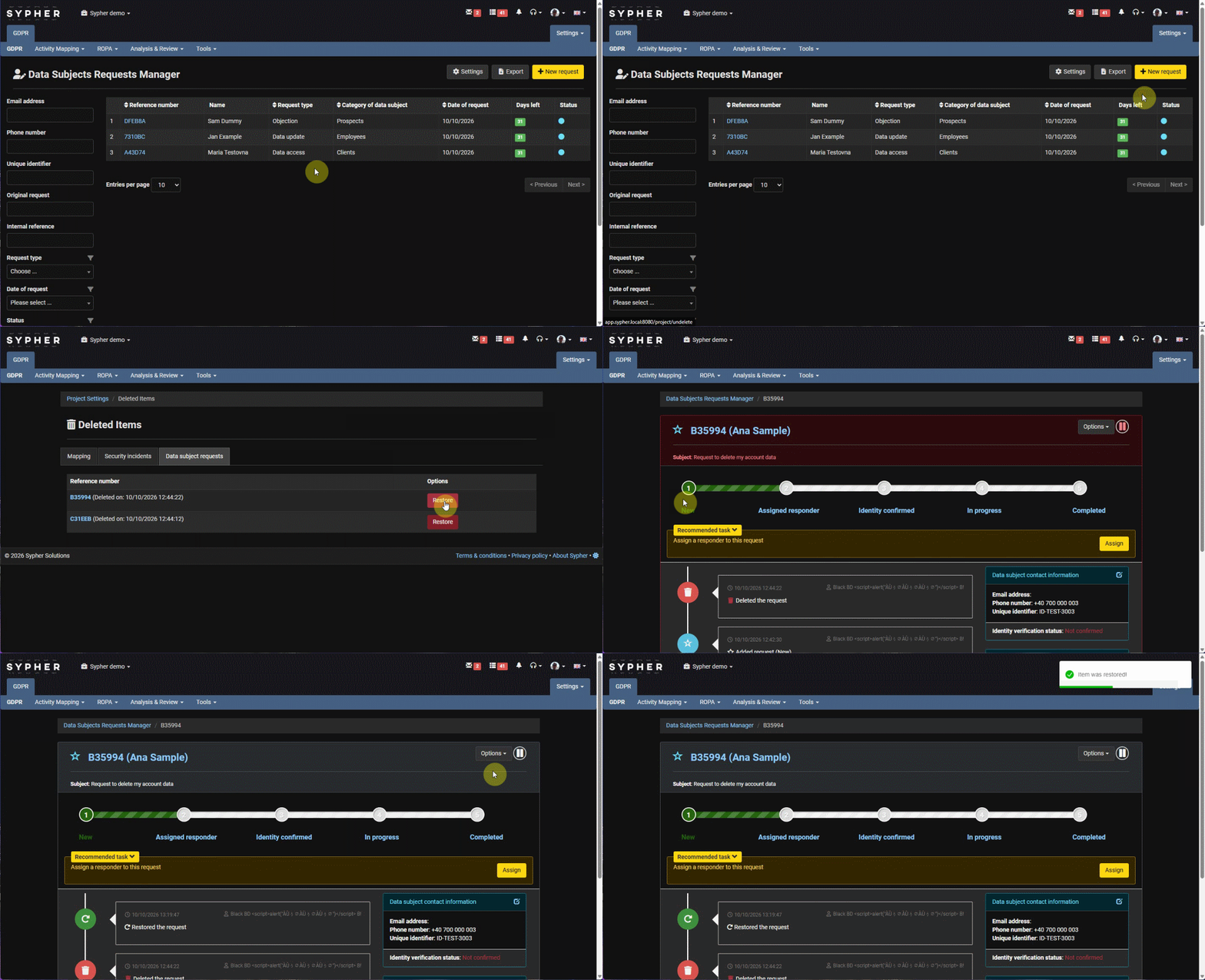
Recover deleted Data Subject Requests
Deleting a data subject request in Sypher isn't final right away. Deleted DSRs are kept for 30 days, and during that time you can restore any of them with a single click, whatever the reason it was deleted.
Go to Project Settings → Deleted Items and open the Data subject requests tab. You'll see every deleted request with its reference number and the date and time it was deleted. From there you can:
- Review before you restore - click the reference number to open the deleted request in read-only mode and check its contents.
- Restore in one click - press Restore next to the request, or use the Restore option in the request's own actions menu. The request returns to your DSR list.
- Keep the audit trail - the restore is recorded in the request's history, so you can always show who brought it back and when.
After 30 days, deleted requests are permanently removed, in line with data minimisation. Restoring is available to users who have the right to manage and assign DSRs.
Deleted Items has two more tabs, Mapping and Security incidents, which work the same way.